 DatumForms
Before you start
You need project administrator access and a draft form. Keep question identities stable when editing forms that already have responses.
Open: Your project → Form Studio.
Steps
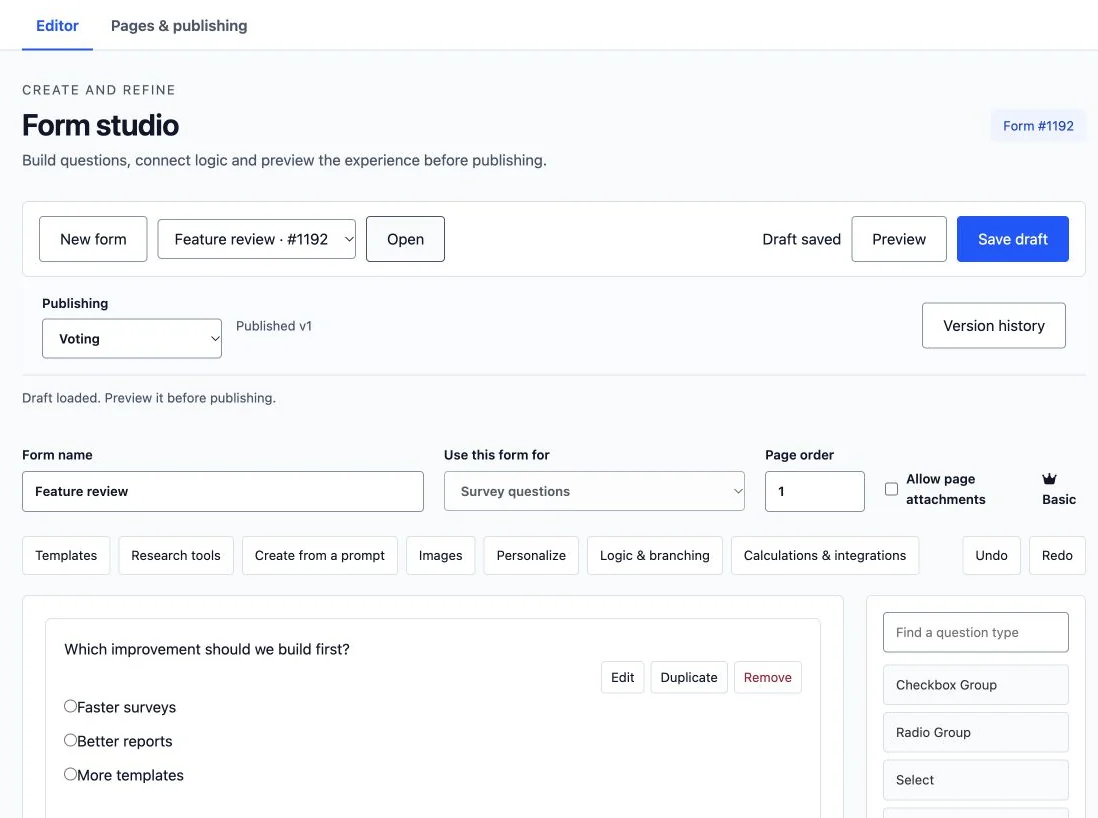
- Open a saved form using Choose a saved form… and Open, or select New form.
- Add text, long text, numeric, dropdown, radio, checkbox or matrix fields from the palette. Use headings and paragraphs for instructions.
- Open each field’s settings and write a clear label. Add choice labels and stored values for choice questions. Use a single-choice type when only one answer is valid.
- Set required fields and relevant constraints. Keep optional explanations optional unless they are essential.
- Choose Save draft, then Preview. Check the actual respondent controls on Desktop and Mobile.
Check the result
The draft retains each saved question and choice. Preview shows the participant experience rather than the builder controls.
Troubleshooting
If changing an answered matrix or a scored criterion is refused, keep its existing identity and create a new question for the changed meaning. Duplication creates a distinct question.
Next steps
Add validation and publish.